
Readability
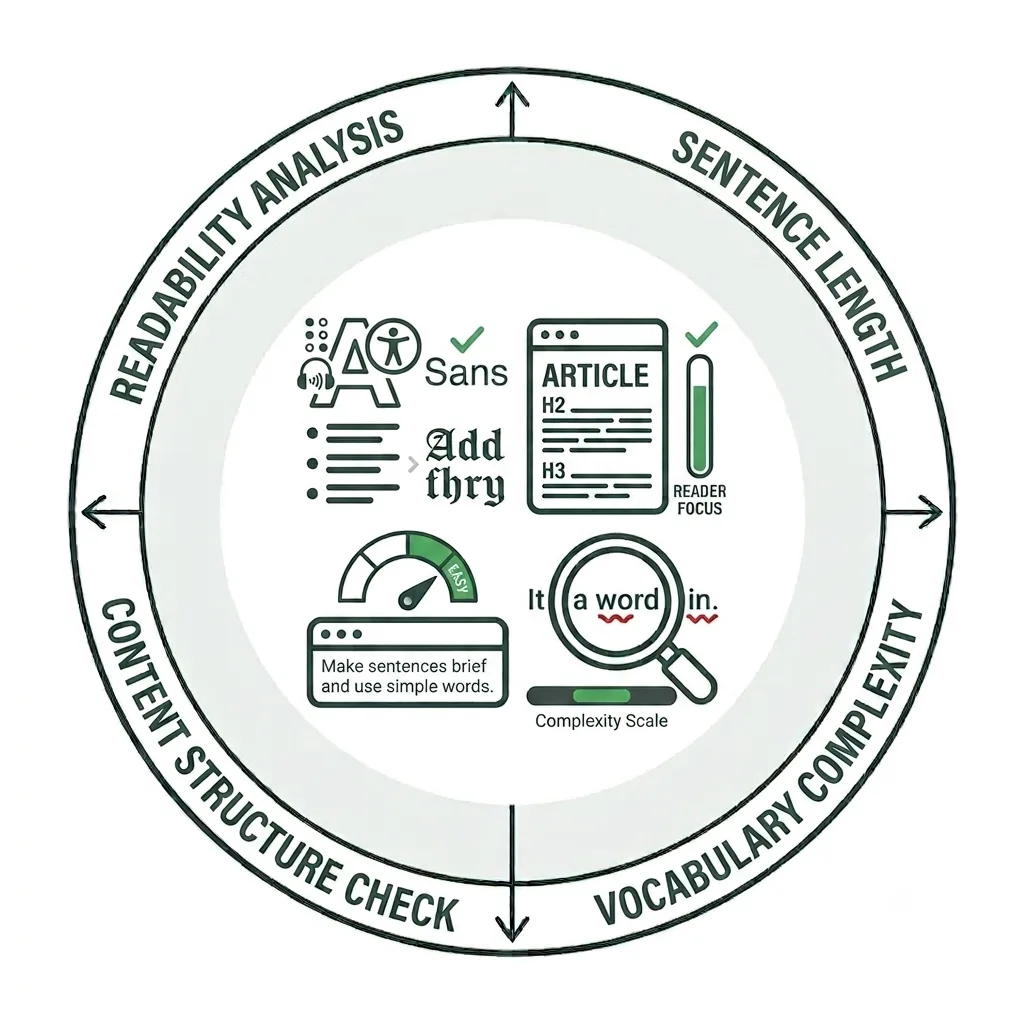
Improving Your Content Readiness
With the overwhelming amount of information available online today, people want to find what they need quickly. In fact, users rarely read web pages word for word. Instead, they tend to scan content, looking for individual words, phrases, and sentences that stand out.
As a result, users read only about 25% of the content on an average web page during a typical visit, according to NN/G. This makes readability—and how you write content—especially important.
The Importance of Readable Web Content
Readability refers to how easy or difficult your content is to understand and is influenced by factors such as vocabulary, word and sentence length, and other criteria used by different readability tests. In this video, we’ll explore why Siteimprove’s readability tools are valuable and how adopting a more inclusive approach to writing for the web can help your content reach more people.
Step-by-Step Guide
Use the step-by-step guide below to learn how to review and address readability issues on your site. Please note that this guide is intended as a supplemental resource and is not a substitute for formal Siteimprove training offered by UMC and Information Systems.
If you do not have access to Siteimprove but would like to use it, you can schedule a training session. We’ll help you become familiar with the platform and ensure you have the knowledge and resources needed to use it effectively.
Readability Test Results Report
To view the readability rankings for all your pages at a glance, select the Site Issues and General Health Report Dashboard from your Dashboards menu.
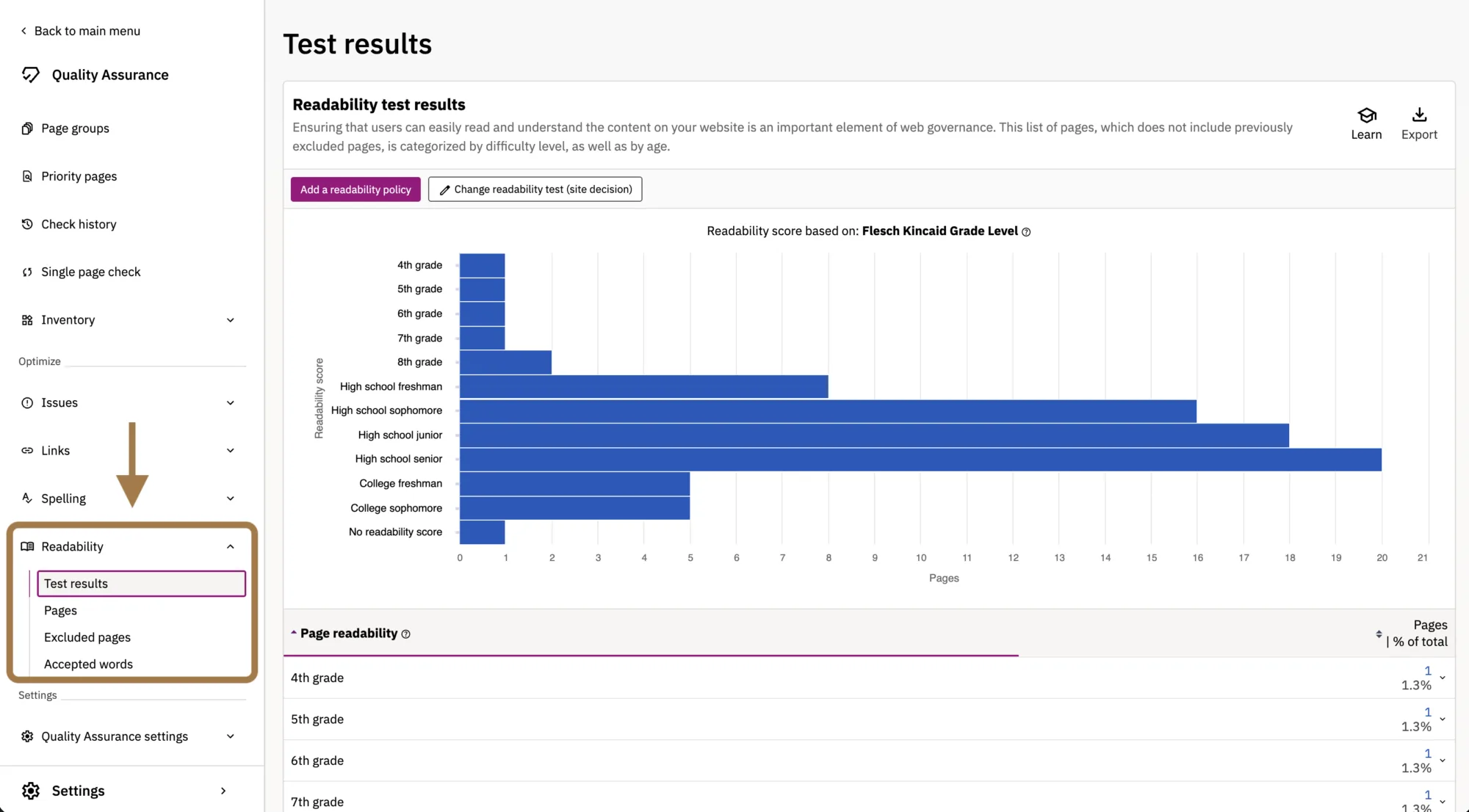
To analyze the readability of individual pages in greater detail, navigate to Quality Assurance > Readability > Test Results.

Readability Test Results & Page Readability
Within the Test Results report, you’ll find two sets of data: Readability Test Results and Page Readability, as shown above.
The Readability Test Results table shows the reading level assigned to your pages based on the composition of their content.
The Page Readability report provides a more detailed breakdown, showing which pages are readable at specific reading ages according to the Flesch-Kincaid Grade Level scoring system.
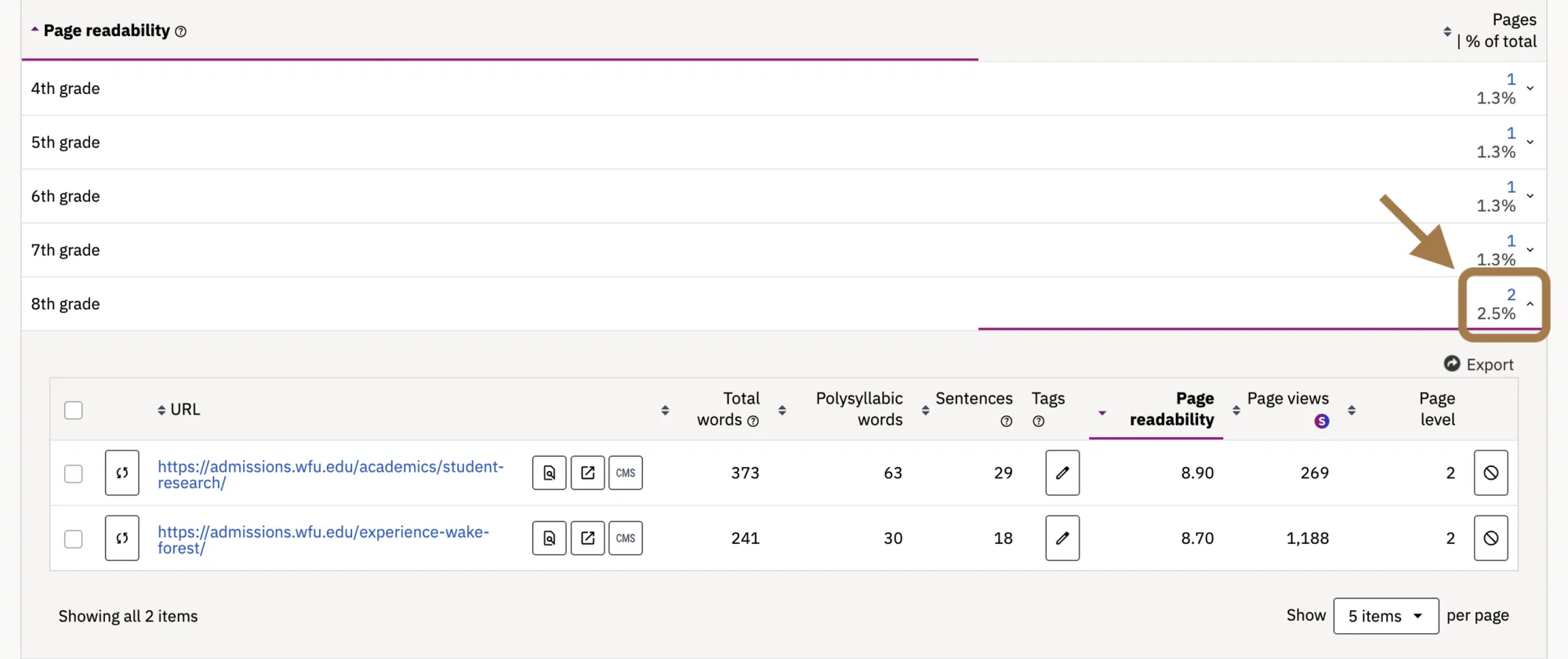
Within the Page Readability report, select any age group (we recommend 8th grade or above) that you would like to view the readability details for. Here you can see the specific readability data for your pages, including total words, polysyllabic words, and sentences.
Click the URL of the page you’d like to get started with.
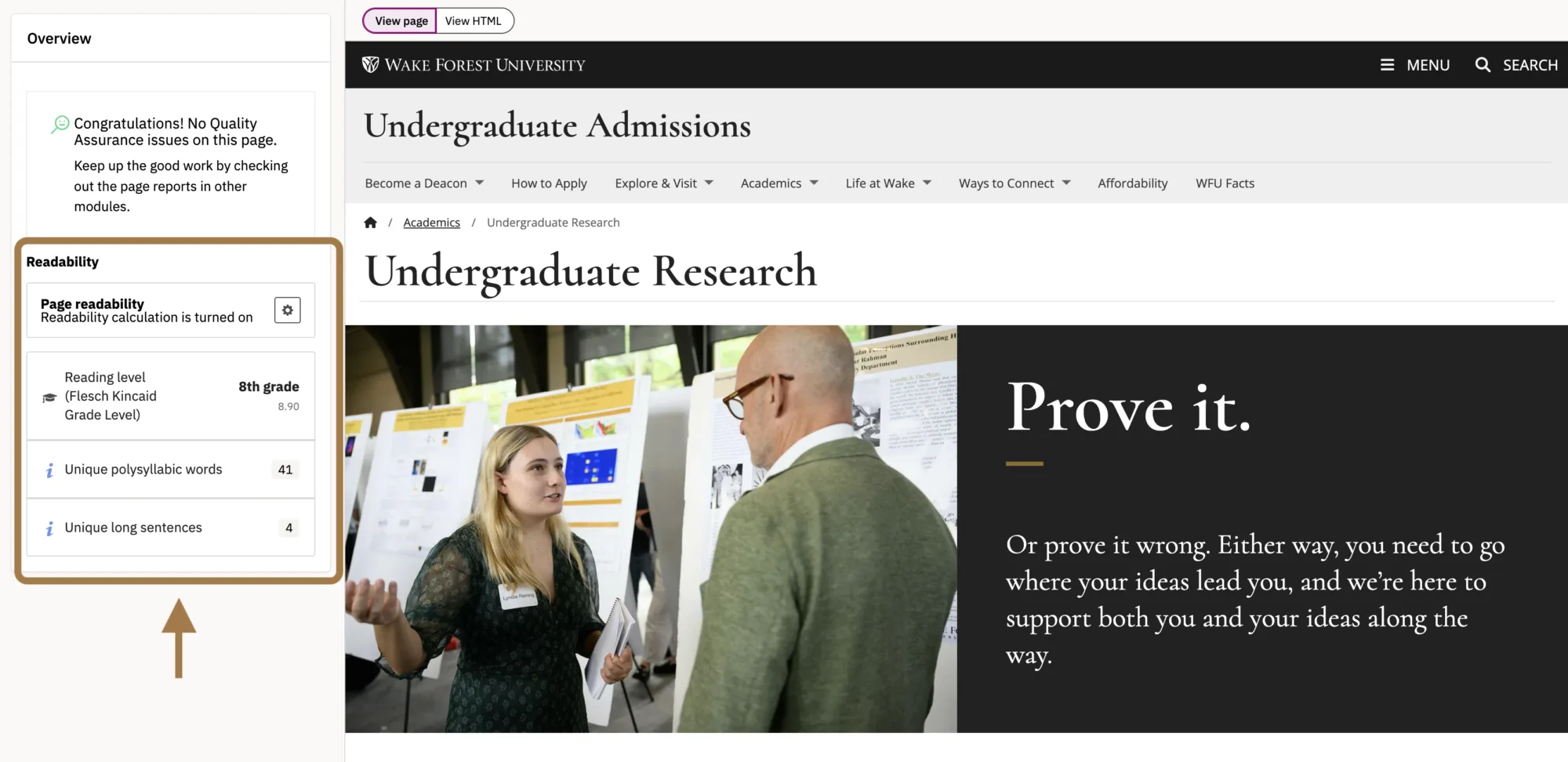
Identifying Readability Issues
On this screen, Siteimprove identifies words and sentences that may be affecting the readability of your content. Under the Readability tab, you’ll find three categories: Reading Level, Unique Polysyllabic Words, and Unique Long Sentences. In this section, we’ll focus on the latter two.
Polysyllabic Words
Polysyllabic words (those with more than three syllables) place extra cognitive load on your readers, particularly those with learning disabilities like dyslexia. Using simpler words where possible will increase the readability of your text.
Use this report to identify if you have polysyllabic words on your page. If you do, you may want to consider using simpler words whenever possible.
Long Sentences
Sentences longer than 20 words are generally considered difficult to read. Research suggests that comprehension can drop to less than 10% when a sentence reaches 43 words—but readers may struggle well before that point. Longer sentences require more mental effort to process, making it harder for readers to quickly understand your message.
Aim to make your sentences between 14 and 20 words for the best readability results. Readers tend to scan online texts, so shorter sentences will help them pick out the information they need more quickly.
Selecting Readability Issues to Remediate
Select the readability issue you’d like to address from the options shown in the previous step. In this example, Polysyllabic Words has been selected.
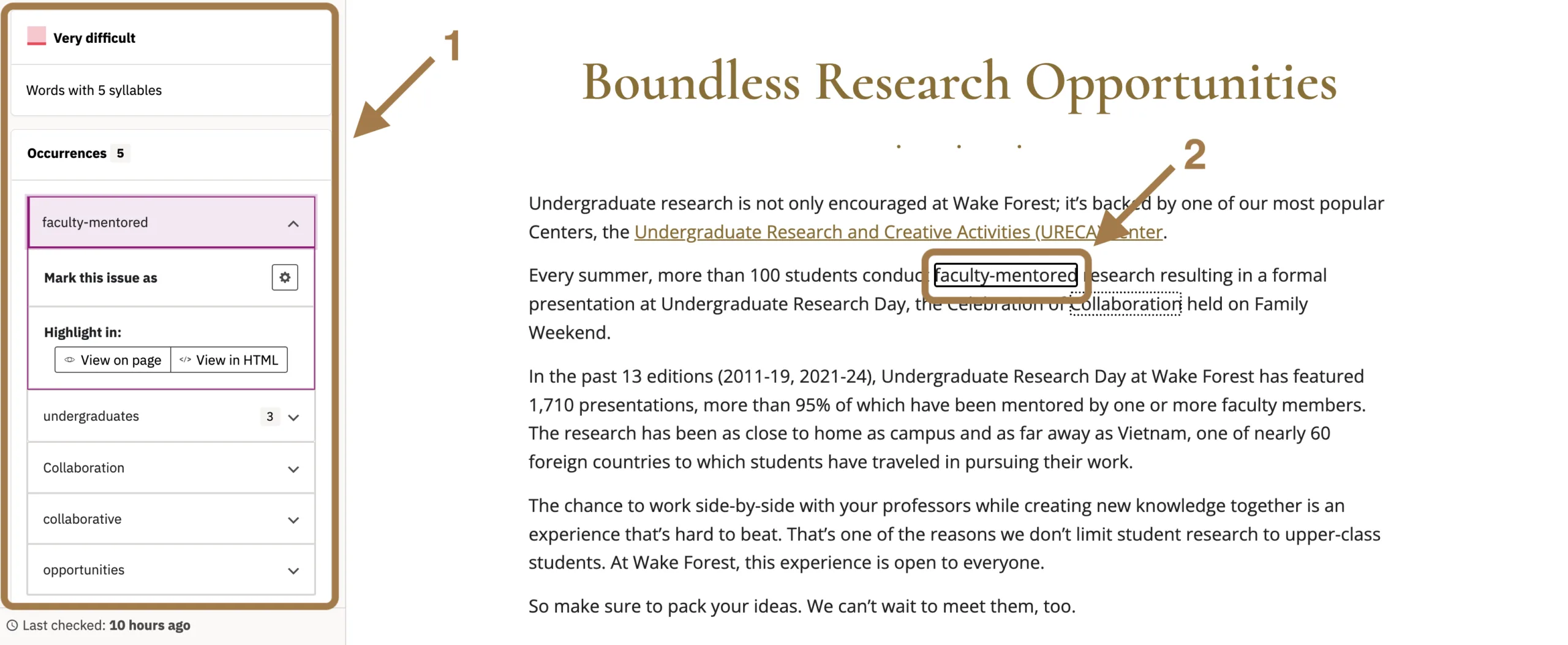
A sidebar will appear, ranking the identified words by reading difficulty. Select the category containing the most difficult words. (Shown as 1 in the screenshot)
Under Occurrences, select any identified word to see where it appears on the page. Each polysyllabic word will be highlighted within the page content. (Shown as 2 in the screenshot)
If you decide it can be replaced by a different word, click on the CMS button at the top of the page. Note: You’ll need to be logged into your WordPress site for this to work.

This will redirect you to the backend of the page in WordPress. From here you can correct the word and save the page once you’re done.
If you have additional readability issues that need to be corrected, go back to your browser tab with Siteimprove that has the table of misspellings (as shown in the step previous to this one). Identify the next word that needs to be reviewed and repeat the process outlined in this step.
Writing for the Right Reading Level
The Flesch-Kincaid Grade Level is a readability test designed for English-language text. It evaluates factors such as word and sentence length, including the use of polysyllabic words, to estimate how difficult content is to understand.
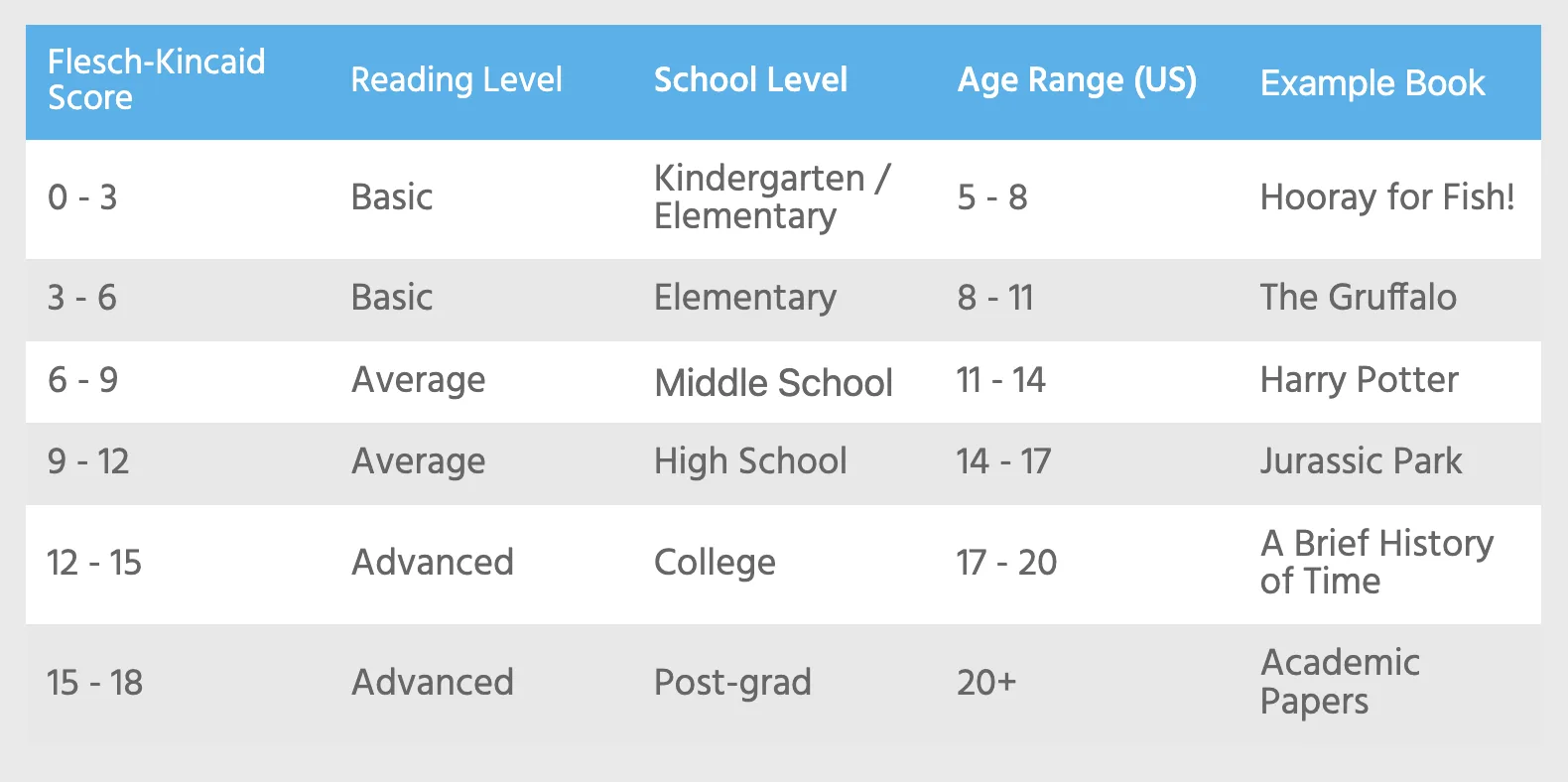
Originally developed to help parents and teachers match reading materials with appropriate age groups, the test produces a score that corresponds roughly to the U.S. grade level required to comprehend the text.
Take advantage of Siteimprove’s readability tools, including the Flesch-Kincaid Grade Level reports, to prioritize your efforts. These insights can help you identify which pages would benefit most from revised content based on factors such as traffic and the importance of the information to your users.
Best practices
If you do not have a specific policy for reading age on your site try and focus on the pages that return a score of 10 or higher (High school sophomore +). It’s also important to consider your audience. If you’re writing for prospective students, you may want to target a reading level appropriate for a high school freshman. For more specialized audiences—such as faculty reviewing published research—a higher reading level may be appropriate, provided the content remains clear, scannable, and accessible.
The length of the texts on a webpage and the way it is formatted can affect what the readability test is able to identify as content. This may affect the score. Some elements, like lists and tables, can make it particularly difficult to identify content.
Understanding reading levels
As explained in the Understanding Reading Levels on the Writing for the Web page, it is considered best practice to write content so that it can be read at an 8th grade reading level. However, while we should all strive to write content that can be read by those with cognitive disabilities or who speak English as a second language, it can prove challenging based on the content we’re required or expected to publish on our site.
Takeaways
All of this can feel like a lot to consider, so here are a few best practices to keep in mind when evaluating the readability of your content:
- Write for your primary audience first. This helps create a consistent tone and voice throughout your site.
- Consider all of your audiences. Is your content easy for everyone who may visit your site to understand without losing the impact of your message and who it’s written for?
- Write short, clear sentences. Avoid overusing polysyllabic words. These practices make content easier to understand, scan, and remember.
- Keep paragraphs short. Writing for the web is different from writing for a textbook. Use lists when presenting multiple items or pieces of related information rather than placing everything in a paragraph.
- Use headings to organize your content. Clear headings make content easier to scan and improve accessibility for people who use assistive technologies.
Your Siteimprove Toolbox

Quality Assurance
Discover the steps you can take to create a more effective, engaging, and user-friendly website experience for everyone.

Analytics
A successful content strategy starts with understanding how your website is performing and what your audience is looking for.

Accessibility
Accessibility isn’t just about what happens behind the curtain—it’s about the experience everyone has in front of it.

SEO & Search
Understanding how visitors find your website and what they want is an essential step in developing an effective content strategy.
Online Presentations
Whether you’re planning to attend an upcoming digital strategy presentation or want to revisit a previous session, explore the topics we cover and resources we share.
Digital Strategy
A strong digital strategy serves as the foundation for your website and every aspect of your digital marketing and communications. Here’s what you need to know.
Want to Chat?
We’re here to support your digital strategy efforts. Reach out with questions or schedule a consultation to discuss your website strategy and explore opportunities for improvement.