
Content
Understanding the performance and impact of your content.
Understanding pageviews, visits, and other key metrics is a good starting point for seeing what resonates with your audience. However, these traditional metrics no longer capture the full picture of website performance. Changes in search behavior and the rise of AI-powered discovery have introduced new ways users engage with content that aren’t reflected in conventional analytics.
Note: This tutorial provides an overview of the Content feature in Siteimprove’s Analytics module and does not cover every available feature or capability.
Content (Analytics)
In this video tutorial, you’ll learn how to use Siteimprove’s Content module and explore the key metrics it provides. Whether you’re looking to understand how many pageviews your site receives, which pages attract the most attention, or how deeply visitors explore your content, we’ll walk through the features and insights that can help you better understand content performance and user engagement.
Pages
Analyzing pageviews, visits, unique and returning visitors, and session length—or the amount of time users spend on a page—is one of the most common ways we evaluate website performance. These metrics provide valuable insight into what users are looking for and which content matters most to them, helping us prioritize our content and the goals we want users to accomplish.
While these metrics remain useful, they no longer tell the complete story. Generative AI tools have given users new ways to learn about Wake Forest without ever visiting our websites. As the ways people discover and interact with information continue to evolve, we must adapt not only how we present our content, but also how we evaluate its performance.
The data available in the Content section still provides valuable information about your site and should be reviewed regularly. Let’s take a look at a few of its most important features.
All pages
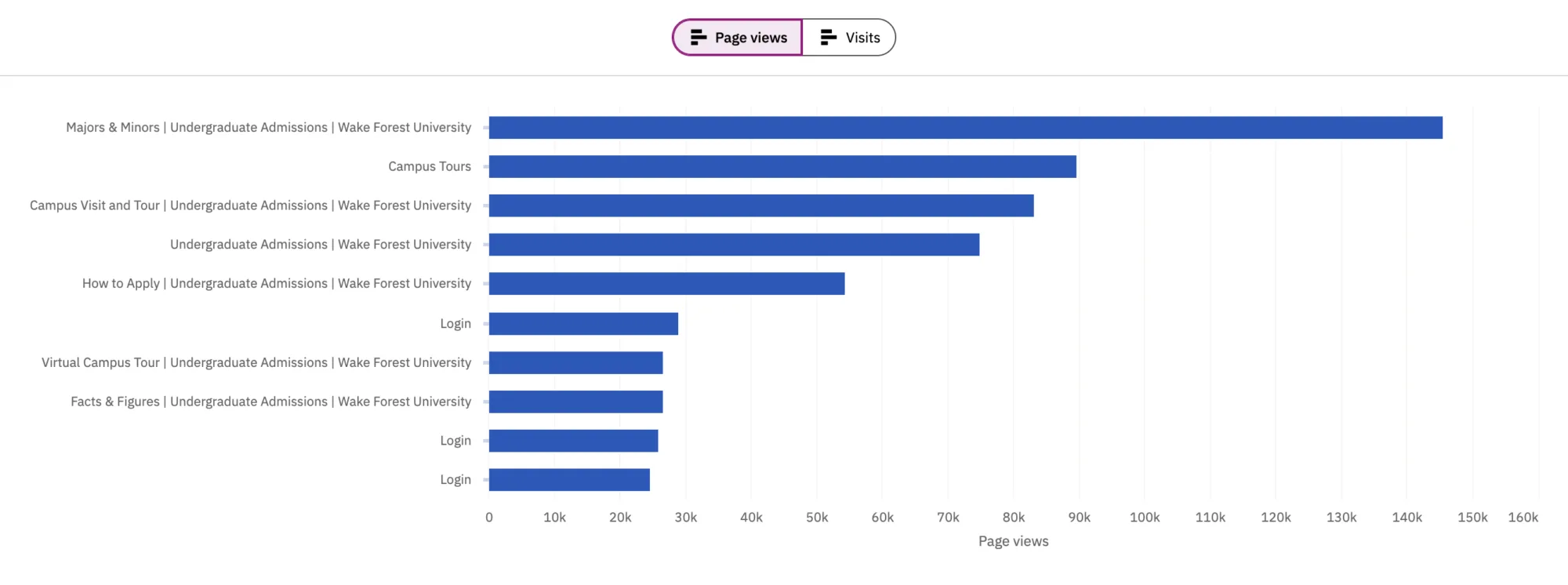
The All pages report shows which pages on your site receive the most traffic, giving you insight into the content your users are most interested in. The data is presented in two ways: a bar graph (shown below) highlighting your ten most-visited pages and a table containing data for every published page on your site. Both views include pageviews and visits.
A pageview represents a single instance of a webpage loading or reloading. A visit, often called a session, represents the period of continuous activity a user spends on your site and can include multiple pageviews. In other words, a single visit may include many pageviews.
Most popular pages, pages with no visits
You can view your most popular pages by selecting Most popular pages or by looking at the bar graph that is displayed at the top of the All pages screen.
Alternatively, if a page on your site receives little or no traffic, you can view that data as well. Are these pages no longer needed? Are they difficult for users to find because there is no clear path to them through your site’s navigation? Or is there another reason they may be receiving less traffic than expected?
The takeaway
As discussed earlier, however, pageviews and visits do not account for everyone who may have discovered or engaged with your content through generative AI tools without visiting your website. As a result, the way you interpret Siteimprove data should reflect this evolving user behavior.
What it comes down to is this: Use pageviews and visits as a guide to understand which pages receive the most traffic—and which may be receiving less than expected. Ask yourself:
- Are the pages at the top of the list the ones you would expect to see there?
- Are there pages receiving less traffic than you anticipated?
- Are there important pages that may be underperforming?
Understanding why certain pages perform better—or worse—than others can help inform your content strategy and ensure your content remains discoverable, wherever and however users find it.
Page Load Time
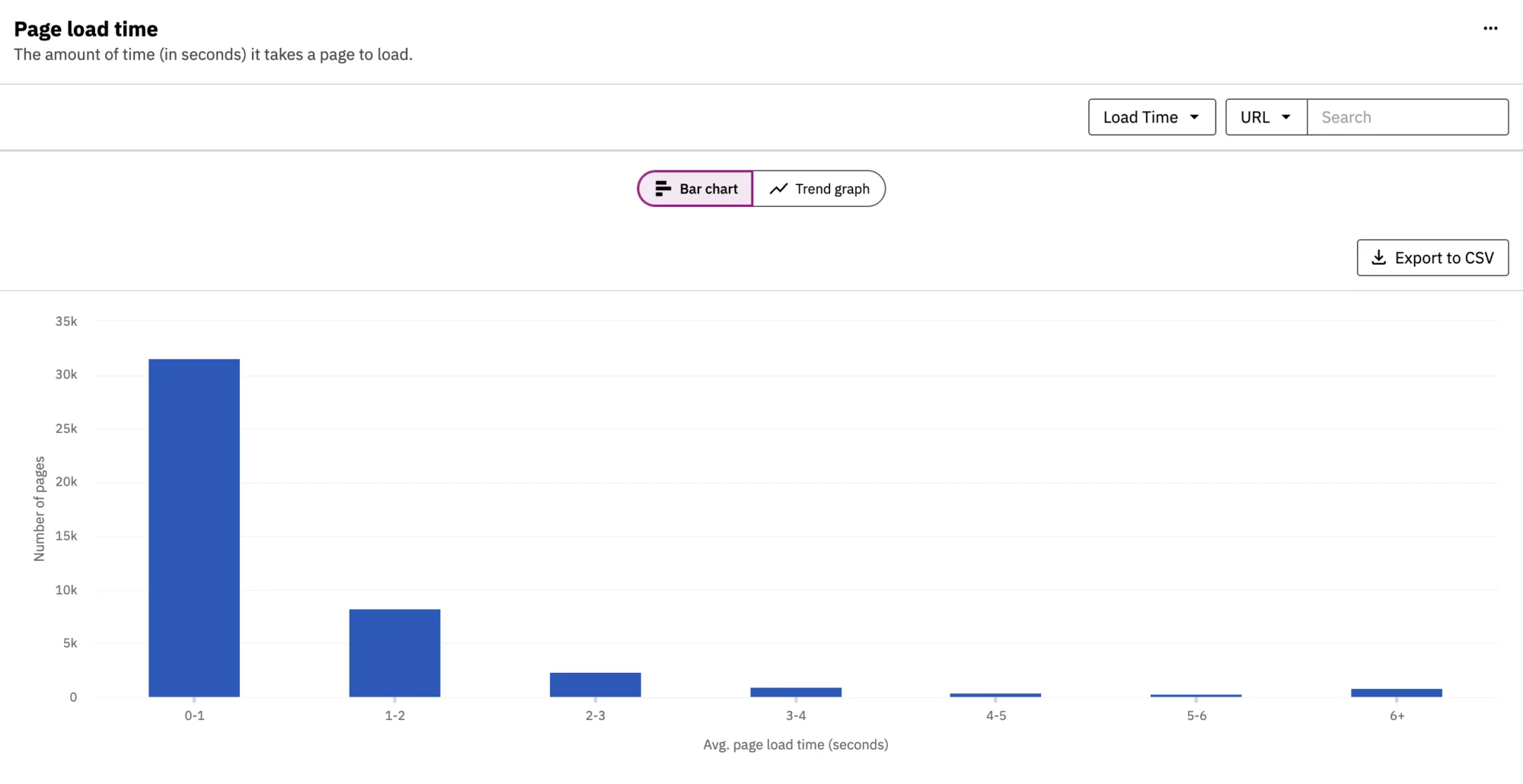
Page load time measures how long it takes a page to load, in seconds.
Large images and other media-rich content can significantly increase the amount of time it takes for a page to load completely. It’s important to consider all of your visitors and remember that not everyone accesses your site using a high-speed internet connection. Visitors using mobile devices—such as phones and tablets—over slower or less reliable connections may experience significant delays, particularly when a page contains large, unoptimized images.
When a page takes too long to load, visitors may leave before the content is fully available, potentially abandoning the page—and your site—altogether.
As a general guideline, aim for a page load time of less than three seconds. The longer a page takes to load, the more likely visitors are to leave. For any page with a load time of more than three seconds, review its content to determine whether everything on the page is necessary and whether any elements—particularly images or other large files—can be optimized to improve performance.
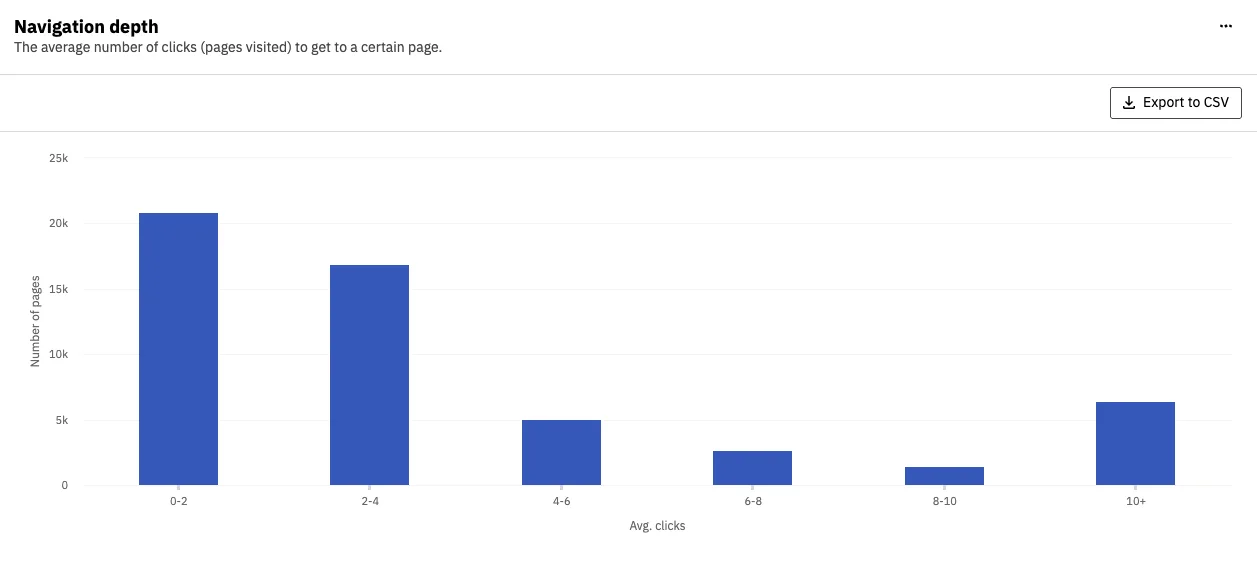
Navigation depth measures the average number of clicks—or pages visited—it takes for a user to reach a specific page on your site.
Ideally, users should be able to reach any page on your site within two to three clicks, regardless of where they begin their journey. If important pages require significantly more clicks to reach, consider whether your site’s navigation and content structure provide a clear and intuitive path to that content.
Why is navigation depth important?
A website’s navigation structure shows how its pages and content are organized and linked. Some pages are available from the main navigation, while others are reached through related pages and found in the content on those pages.
Visitors rely on navigation to find information. If a page is hard to find or not linked from the navigation or other common entry points, users may never see it, resulting in more clicks and time that it takes to find information, which ultimately leads to more frustrated visitors.
Search engines and Wake Forest’s global site search can help users find content, but they should not replace a clear content structure. Organizing content well and linking related pages helps users find what they need, no matter where they start.
Your Siteimprove Toolbox

Quality Assurance
Discover the steps you can take to create a more effective, engaging, and user-friendly website experience for everyone.

Analytics
A successful content strategy starts with understanding how your website is performing and what your audience is looking for.

Accessibility
Accessibility isn’t just about what happens behind the curtain—it’s about the experience everyone has in front of it.

SEO & Search
Understanding how visitors find your website and what they want is an essential step in developing an effective content strategy.
Online Presentations
Whether you’re planning to attend an upcoming digital strategy presentation or want to revisit a previous session, explore the topics we cover and resources we share.
Digital Strategy
A strong digital strategy serves as the foundation for your website and every aspect of your digital marketing and communications. Here’s what you need to know.
Want to Chat?
We’re here to support your digital strategy efforts. Reach out with questions or schedule a consultation to discuss your website strategy and explore opportunities for improvement.